Direct answer: If you need a reliable OBD-II laptop interface, choose USB or Ethernet adapters that offer stable data transfer, broad compatibility, and clear live-data access. This guide highlights five top options, each suited to different user types—from Ford and Mazda specialists to BMW enthusiasts and general repair hobbyists. Whether you’re parsing engine codes on a laptop or configuring vehicle modules, these interfaces are selected for stability, ease of use, and practical diagnostics. See the comparison table below to quickly identify the best fit for your needs.
| Product | Best For | Key Benefit |
|---|---|---|
| OBD2 to USB Cable Diagnostic Tool | Ford/Mord/Mazda Specialists | Dedicated MS-CAN/HS-CAN switch for hidden module access |
| QivaZira ENET OBD2 Cable | Advanced ECU Coding | Stable ENET data connections for module configuration |
| WiFi ELM327 OBD2 Adapter | Mobile Diagnostics | WiFi, no laptop needed for basic scans |
| YOUNGLINK USB OBD2 ELM327 Cable | Broad Vehicle Coverage | HS CAN & MS CAN switch for modern vehicles |
| Bluechok Enet OBD2 RJ45 Cable | BMW Coding | ENET-enabled module programming and hiding |
OBD2 to USB Cable Diagnostic Tool for Laptop

This tool provides a dedicated MS-CAN and HS-CAN switch, enabling access to modules often missed by basic scanners, such as Airbag, ABS, and Body Control. The wired USB design minimizes signal dropouts for live monitoring and critical programming. It is particularly suited for Ford and Mazda owners who rely on FORScan, Config, or FoCCCus for deeper diagnostics. Best for: Ford/Mazda specialists needing reliable module access. Limitation: Primarily a USB interface; not designed for wireless use.
QivaZira ENET OBD2 Cable for ENET Diagnostics

The QivaZira ENET OBD2 cable uses CAT5e cabling with gold-plated RJ45 connectors for stable physical connections and reliable data transfer. It supports module configuration and is compatible with various F-Series and G-Series vehicles, making it a strong choice for modern ECU coding and diagnostics. Best for: Advanced ECU configuration and BMW/M-Series/other ENET-enabled diagnostics. Caution: Requires compatible ENET tooling and software for full functionality.
ULTRAOBD WiFi ELM327 OBD2 Adapter

This WiFi ELM327 adapter is designed for mobile use with iOS and Android devices. It plugs into the OBD port and connects over WiFi, enabling on-the-go diagnostics via phone or tablet. Important notes: it does not support FORScan and is not intended for motorcycle diagnostics. Best for: Mobile diagnostics and quick checks via smartphone apps. Caution: Not a laptop-based tool; limited to compatible apps on mobile devices.
YOUNGLINK USB OBD2 ELM327 Cable

The YOUNGLINK USB adapter is designed for broad vehicle coverage and includes HS CAN and MS CAN switching for optimized compatibility with ScanMaster and other software. It is particularly suited for Ford, Lincoln, Mercury, and Mazda models after 1996 with live data and fault-code analysis. Best for: Broad-coverage diagnostics on Ford/Mazda and similar models. Limitation: Some newer models may require software updates or alternate interfaces for full compatibility.
Bluechok Enet OBD2 RJ45 Ethernet Cable

The Bluechok ENET cable supports module programming and module hiding for BMW vehicles, using ENET data to enable precise coding. It’s a durable CAT5e cable with a robust RJ45 connector and a flexible 6.6-foot length, designed for professional use. Best for: BMW coding scenarios and module management. Caution: Requires compatible ENET-compatible diagnostic tools and software for full capability.
EnruigeOK 2 Pin to 16 Pin OBD2 Power Cable Adapter

EnruigeOK provides a 2-pin to 16-pin power cabling solution for OBD trackers and wired deployments. Assembled in the USA, it offers straightforward integration for wired OBD tracking devices. Best for: Wired OBD trackers like MOTOsafety and Vyncs. Limitation: Primarily a power-adapter accessory, not a full diagnostic interface on its own.
OBDLink LX Bluetooth OBD2 Adapter

OBDLink LX provides high-speed scanning to turn a PC, laptop, or Android device into a diagnostic tool. It uses Bluetooth for wireless access and works with OBDLink app on Android and OBDwiz on Windows. Best for: Wireless diagnostics on Windows and Android. Caution: Not compatible with Apple iOS devices.
iKKEGOL Pocket OBD2 Splitter Adapter
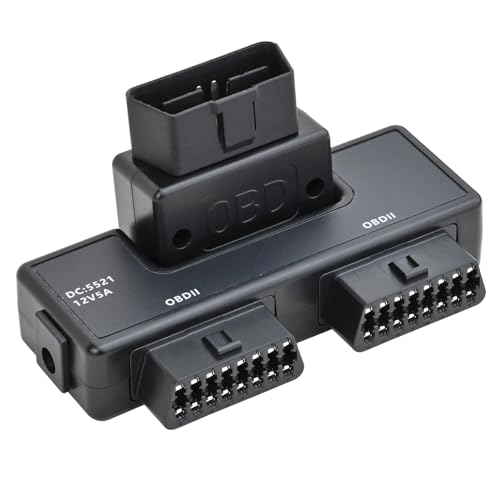
The iKKEGOL splitter allows running two OBD2 applications from a single device, a handy feature for diagnostic tools along with GPS, HUD, or other dongles. Best for: Multitasking diagnostic setups. Limitation: Primarily a splitter; does not provide additional data processing by itself.
Buying Guide: Key Purchase Considerations
- Interface type: USB, Ethernet (ENET), or Wireless (Bluetooth/WiFi). Choose based on whether you need mobility, a physical stable connection, or ENET-enabled module coding.
- Vehicle compatibility: Some interfaces excel with Ford/Mazda or BMW ENET configurations; verify HS-CAN/MS-CAN support for your vehicle.
- Software ecosystem: Ensure the tool supports your preferred software (FORScan, FoCCCus, BMW ENET tooling, Torque, OBDWiz, etc.).
- Data access: Look for live data, fault-code clearing, freeze-frame data, and module readouts. Some tools emphasize coding while others focus on broad diagnostics.
- Portability vs. stability: Wireless adapters offer mobility but may drain battery or require stable WiFi, while wired USB/ENET options deliver consistent performance in-lab.
- Caution on limitations: Some devices may not support FORScan or certain vehicle models; read product notes for specific restrictions.
Frequently Asked Questions
- What is the difference between USB and ENET OBD interfaces?
Answer: USB provides straightforward laptop connectivity and high data stability, while ENET enables more advanced module access and coding for supported vehicles. - Can I use these with a smartphone?
Answer: Some adapters support mobile apps over Bluetooth or WiFi, but many are designed for laptop/PC use; check compatibility before purchase. - Do these adapters support all vehicles?
Answer: Most cover a broad range of 1996+ vehicles with OBD-II, but some brands (like certain BMW ENET models) may require specific interfaces or software. - Is FORScan supported by all OBD adapters?
Answer: No. FORScan compatibility is limited to specific adapters and configurations; verify support in product notes. - What should I consider for live data monitoring?
Answer: Look for low-latency data transfer, stable connections, and software that can display wide sensor data in real time. - Are there safety considerations when using online or offline modules?
Answer: Use trusted software and avoid making changes to critical vehicle modules without proper guidance or documentation.