For buyers seeking a reliable car navigation system with a reverse camera, the right choice blends real-time navigation, backup visibility, and easy installation. These picks target different needs: wireless CarPlay/Android Auto in portable displays, larger wired screens for trucks or RVs, and compact dash-mounted units. The top five options below are curated for clarity, compatibility, and safety on American roads. Each product highlights who it’s best for and why it stands out, plus a practical limitation to consider before you purchase.
| Product | |||
|---|---|---|---|
| HAUXIY 9″ Wireless CarPlay Screen | Drivers wanting wireless CarPlay/Android Auto in a portable display | OTA updates and real-time maps with voice control | Requires phone connection for apps not preinstalled |
| Befumly Portable Carplay Screen | Drivers seeking plug‑and‑play setup with backup camera | Easy wireless CarPlay/AA, built-in GPS and backup cam | Limited to 7-inch display for smaller cabins |
| PixelMan Backup Camera with AHD 1080P | Users prioritizing high-definition rear view and night vision | AHD support, strong image quality, wide angle | Requires compatible display and wiring integration |
| Kalakus Wireless 9″ Car Stereo | Owners upgrading older vehicles with wireless CarPlay/AA | Wireless CarPlay/AA, mirror‑link, versatile playback | Wireless performance may vary by vehicle |
| Losuudy Truck RV Camera System | Large vehicles needing a comprehensive CarPlay/Android Auto system | All‑in‑one CarPlay with dual HD 1080P cameras and navigation | Installation effort for bigger vehicles |
HAUXIY 9″ Wireless CarPlay Screen

Best for: drivers who want a portable CarPlay/Android Auto experience with ongoing updates. This HAUXIY unit connects to iPhone or Android via Bluetooth and WiFi for CarPlay or Android Auto, uses real-time maps, and supports voice control through Siri or Google Assistant. It includes OTA updates to stay compatible with evolving apps, which helps reduce obsolescence typical of standalone car radios. The device is best when you value a seamless wireless setup and a backup camera for added reversing safety. It may require a smartphone connection for non-preinstalled apps, so plan for occasional app activation through your phone.
Befumly Portable Carplay Screen With Backup Camera

Best for: drivers who want a plug‑and‑play CarPlay/Android Auto experience without dashboard disassembly. This 7-inch, HD touchscreen supports wireless CarPlay and Android Auto, pairing easily for auto-reconnect on startup. The built-in GPS navigation helps with turn‑by‑turn directions, while the 1080P backup camera provides a wide, night‑vision view when reversing. It’s a strong pick for quick upgrades in older cars. A limitation to consider is the smaller 7-inch display, which may be less ideal for frequent passengers or drivers who prefer larger visuals.
PixelMan AHD 1080P Backup Camera
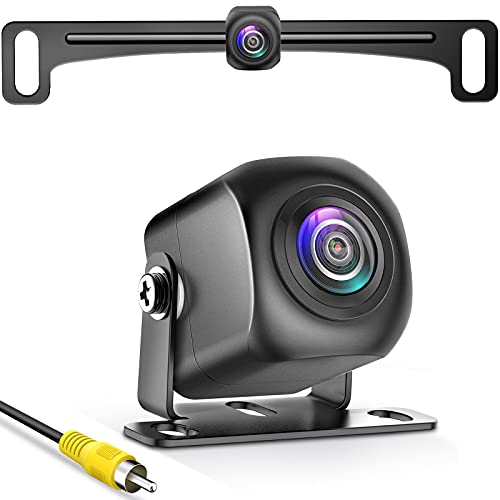
Best for: buyers prioritizing high-definition reverse visibility and robust night performance. PixelMan’s PMD2A-S camera delivers 1080P AHD output with a large 1/2.7-inch sensor and a 170-degree viewing angle, improving color fidelity and brightness. It supports switching between HD and AHD for compatibility with certain screens. The main caveat is the need for a compatible monitor and proper wiring to unlock its full clarity; without a compatible display, you may not realize the 1080P benefits.
Kalakus Wireless 9″ Car Stereo
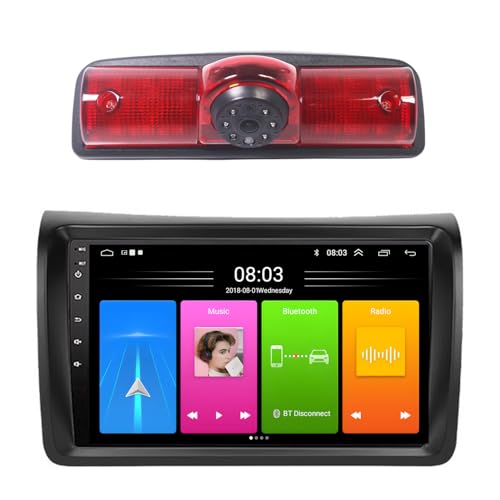
Best for: those upgrading an older vehicle with wireless CarPlay/Android Auto and enhanced audio options. Kalakus offers a 9-inch wireless CarPlay/AA experience with improved audio output through Bluetooth and optional FM/aux connections. The built‑in mirror link supports wireless camera integration and app casting, helping you access video apps in a pinch. Choose this if you want a flexible wireless system and do not mind occasional variability in wireless performance across different car interiors. A limitation is that wireless performance can vary by vehicle and installation specifics.
Losuudy Truck RV CarPlay & Android Auto System

Best for: large vehicles such as semi-trailers, RVs, or buses that require a robust, all‑in‑one CarPlay/Android Auto platform with a larger display. This 10-inch touch screen offers navigation, voice control, and dual HD 1080P rear cameras for comprehensive rear visibility. It suits drivers who want a fixed, wired system for steady performance during long hauls. The installation may be more involved due to the vehicle size and wiring complexity, so plan for professional assistance if needed. The system emphasizes real-time navigation and hands-free operation through Siri or Google Assistant for safer long-distance driving.
Buying Guide: What to Consider When Choosing a Car Navigation System With Reverse Camera
Ease of installation, display size, and connectivity determine how well a system fits your vehicle and daily routine. The following questions help narrow your choices:
- Wireless vs. wired: Do you prefer wireless CarPlay/Android Auto to avoid dashboard wiring, or is a wired system acceptable for a permanent install?
- Display size and clarity: Is a 7-inch screen enough, or do you need a 9–10 inch display for clearer maps and camera views?
- Camera features: Do you require night vision, wide-angle viewing, and multi-camera support for comprehensive rear visibility?
- NAV and app availability: Are real-time maps (Google Maps/Waze) essential, and must the system push OTA updates?
- Vehicle compatibility: Is the product designed for cars, trucks, RVs, or trailers, and does it require professional installation?
- Audio and extra features: Do you want enhanced audio output, Bluetooth, FM/aux, and mirror link for videos?
Practical comparison by use-case
- Best for quick upgrades in older cars: Befumly 7″ portable CarPlay screen with backup camera.
- Better for a large truck or RV setup: Losuudy 10″ all-in-one CarPlay system with dual cameras.
- Choose this if you want OTA updates and real-time navigation on a portable screen: HAUXIY 9″ wireless CarPlay.
- Better for high-definition backup views: PixelMan AHD 1080P camera pairing with appropriate display.
- Avoid this if you need a fully wired, factory-like installation: Smaller portable units may require more cabling and mounts than fixed dashboards.
Installation and setup tips
- Plan cable routing in advance and avoid interfering with airbags or critical components.
- Ensure compatible display and camera connections (HDMI/AHD, USB, or RCA inputs as required).
- Test CarPlay/Android Auto connectivity first with the vehicle off, then confirm live GPS navigation with the engine running.
FAQ
- Q: Do these systems work in all states? A: They work with standard regional maps via connected apps, but availability depends on your phone’s data plan.
- Q: Can I install these myself? A: Most are designed for DIY installation, though larger trucks or RV setups may benefit from professional help.
- Q: Is wireless CarPlay slower than wired? A: Wireless CarPlay can have a slight delay compared to wired, depending on signal strength and phone model.
- Q: Do backup cameras require special wiring? A: Some models are plug-and-play; others require wiring to the vehicle’s power and display system.
- Q: Are updates automatic? A: Many units offer OTA updates, but confirm with the product’s documentation to ensure automatic delivery.