Choosing the right OBD code reader depends on your vehicle type and diagnostic needs. This guide targets buyers seeking reliable OBD1 and OBD2 scanning capabilities, clear code definitions, and practical diagnostic features. It highlights models suitable for classic Ford era vehicles (OBD1) and modern cars (OBD2). The top picks include tools for Ford, Lincoln, Mercury, and multi-vehicle compatibility. The quick summary below helps you compare options at a glance.
| Product | Best For | Key Benefit |
|---|---|---|
| JOPLAY OBD1 Code Reader (Ford 1981-1995) | Classic Ford vehicles | Built-in code definitions on a 2.4″ LCD |
| INNOVA 3145 Ford Digital OBD1 | Ford/EDC-IV era vehicles | Clear digital display for Ford-era trouble codes |
| ANCEL AD310 OBD II Scanner | Modern vehicles 1996+ | Popular, easy-to-use OBD2 scanner with live data |
| FOXWELL NT301 OBD2 Scanner | General OBD2 diagnostics | Live data, CEL read/clear, compatible with many models |
| MOTOPOWER MP69033 OBD2 Scanner | Broad OBD2 coverage | Wide protocol support and multilingual UI |
JOPLAY OBD1 Code Reader for Ford (1981-1995)
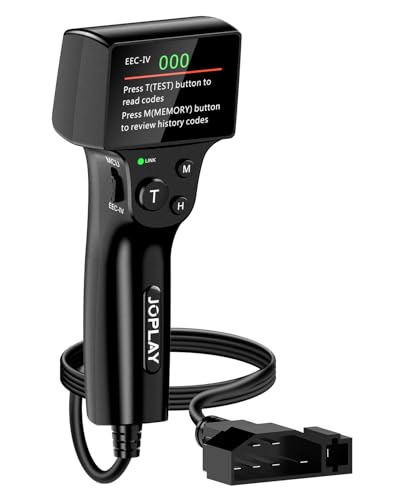
The JOPLAY OBD1 reader supports Ford, Lincoln, and Mercury models from 1981 to 1995, interfacing with EEC-IV and MCU systems. It includes a built-in 2.4″ LCD to display code numbers and definitions, eliminating the need to interpret blinking lights. Best for enthusiasts or owners of classic Ford-era vehicles who want quick, on-device code definitions. It provides KOEO, CM, and KOER diagnostic modes for more targeted checks. A potential limitation is that ABS codes are not supported.
JOPLAY OBD1 Code Reader (Gray) for Ford, 1981-1995

This variant mirrors the 2-in-1 OBD1 functionality with reinforced pins and a long 9-foot cable. It is ideal for long diagnostic sessions or vehicle installations where reach matters. It remains best for Ford-family classic cars and uses KOEO/CM/KOER tests. Note that this model does not support ABS codes, so plan accordingly if ABS diagnostics are needed.
ANCEL AD310 Classic OBD II Scanner

The ANCEL AD310 is a compact, reliable OBD2 scanner suitable for 1996+ vehicles. It reads and clears emission-related codes, shows live data, freeze frames, and I/M readiness. It’s a strong choice for everyday diagnostics and quick checks by homeowners or hobbyists. Best for users who want a straightforward tool with clear display and direct battery-free operation from the vehicle connector. It does not support some advanced functions found in professional tools.
FOXWELL NT301 OBD2 Scanner

The NT301 provides robust OBD2 diagnostics with fault code reading, live data graphs, and VIN retrieval. It is compatible with most 1996+ gasoline cars, light trucks, and SUVs, including some 12V diesel models. A notable limitation is that it does not support ABS, SRS, EPB, or some advanced features. It’s best for general diagnostics and real-time data monitoring without deep bidirectional controls.
MOTOPOWER MP69033 OBD2 Scanner

The MP69033 supports multiple OBD2 protocols and offers a 2.8″ LCD with backlight for easy reading. It reads and clears codes, displays live data, freeze frame, and I/M readiness. Best for users who want broad compatibility across many 1996+ vehicles and a simple interface. A limitation is that some advanced features are not included in entry-level models, so check compatibility with your car’s specifics before purchase.
Buying Guide: Key Purchase Considerations
- Vehicle type and era: Choose OBD1 tools for older Ford-based vehicles (1981–1995) and OBD2 tools for most modern cars (1996+).
- Diagnostic capabilities: Prioritize tools with code definitions, KOEO/KOER/CM tests for OBD1 and live data, freeze frame, and I/M readiness for OBD2.
- Display and usability: Look for clear digital displays, readable screens, and straightforward menu navigation to minimize guesswork.
- Connectivity and power: Ensure the tool draws power from the vehicle; battery-free operation is common for some models but verify for your setup.
- Expansion and compatibility: If you own multiple makes, prefer multi-vehicle scanners with broad OBD2 protocol support.
FAQ: Quick Answers For Buyers
- What is the difference between OBD1 and OBD2?
OBD1 is era-specific and varies by manufacturer (often vehicle-year dependent). OBD2 is standardized and widely compatible across many makes and models from 1996 onward. - Can I use an OBD2 scanner on an OBD1 vehicle?
Generally no. OBD2 tools are not designed to read OBD1 systems; use an OBD1 scanner for older Ford-era vehicles. - Do I need a professional-grade scanner for simple checks?
For basic fault code reading and live data, consumer-grade OBD2 scanners cover most needs. Complex diagnostics may require professional tools. - Is a live data display important?
Yes. Live data helps verify sensor behavior and trace intermittent issues beyond static codes. - Should I worry about ABS or SRS support?
If you specifically need ABS/SRS diagnostics, choose a tool that explicitly supports those modules, since many entry-level models may exclude them. - How do I verify compatibility with my vehicle?
Use the manufacturer’s vehicle compatibility checker or confirm the model year and engine family with the tool’s product page.