Answering buyers who want to add or restore CD playback through a vehicle’s factory radio, these integrated USB CD players connect directly to the USB data port. They are best for drivers who want to keep existing CD libraries intact while preserving factory radio controls. The top picks below fit a range of vehicles and installation styles, from simple single-cable add-ons to deluxe kits with remote control. This guide helps you choose the right unit for your car, with practical notes on compatibility and installation.
| Product | Best For | Key Benefit |
|---|---|---|
| (AIE)-USBCDPLAY2 | Vehicles with USB data port access | Single-cable install and full radio control retention |
| (AIE) VN-CDUSB | Simple add-ons with straight USB port hookup | Compact design with reliable indexing |
| Xglysmyc External USB Car CD Player | Android navigation systems and USB-enabled cars | Wide compatibility and straightforward plug‑and‑play |
| (AIE)-USBCDPLAY1 | Similar to VN-CDUSB for basic setups | Consistent performance with WMA/WAV formats |
| (AIE) SN-CDUSB-CP | CarPlay-enabled radios requiring wireless CarPlay | Wireless CarPlay integration via CD player module |
(AIE)-USBCDPLAY2 – Integrated Car CD Player
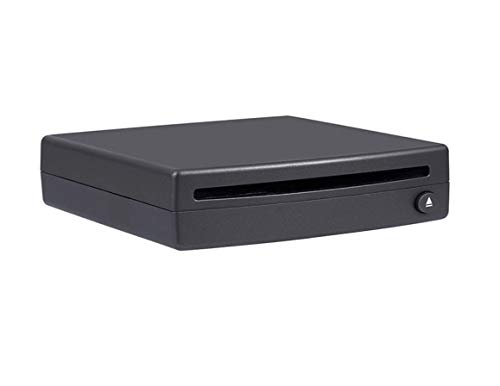
The (AIE) USBCDPLAY2 adds a single-cable connection via the USB data port on the factory radio. It supports WMA and WAV formats and can be mounted vertically or horizontally (not upside down or beyond zero degrees). It delivers music from CDs through the vehicle’s existing audio system while preserving full radio control. Best for drivers seeking a straightforward install with minimal wiring and reliable CD indexing after a brief 10–20 second start-up.
Best for: drivers who want a simple, install-friendly CD option without changing the head unit’s behavior. Limitation: MP3 playback is not supported by this model.
(AIE) VN-CDUSB – Add-on Vehicle USB CD Player
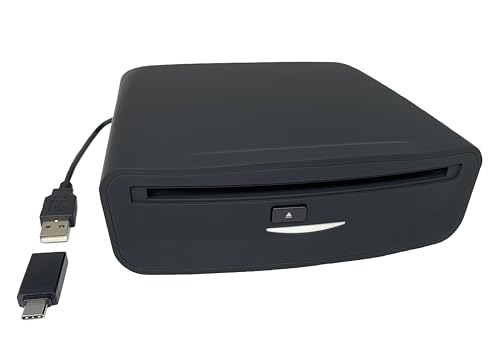
The VN-CDUSB offers a single-cable installation by plugging into the factory radio USB data port and includes a USB‑A to USB‑C adapter if needed. It can be mounted vertically or horizontally and plays WMA or WAV CDs. It preserves radio control functionality and requires about 10–20 seconds for each CD to index during install. This model suits buyers who want a compact, reliable add-on with minimal setup.
Best for: users who prefer a compact, predictable installation with broad USB compatibility. Limitation: MP3 format is not supported, so your MP3 CDs won’t play.
(Xglysmyc) External USB Car CD Player

The Xglysmyc CD Player is a portable, external unit designed for plug-and-play use with USB-connected car radios and Android navigation systems. It is widely compatible with USB-enabled desktops and smart TVs when used in other contexts. It reads WMA or WAV CDs, while MP3 is not supported. The device indexes CDs in about 10–20 seconds per disc, enabling a smoother installation experience.
Best for: drivers who want broader device compatibility beyond traditional car radios, including Android navigation systems. Limitation: MP3 playback is not supported, and the setup depends on the host system’s USB reading ability.
(AIE) USBCDPLAY1 – Integrated Car CD Player
The USBCDPLAY1 mirrors the single-cable USB port installation approach, designed to connect to the factory radio’s USB data port. It supports WMA and WAV formats, maintains full radio control, and requires 10–20 seconds for each CD to index. The unit can be mounted vertically or horizontally but not inverted. This option is a solid choice for straightforward CD replay with dependable indexing.
Best for: buyers seeking a dependable, minimal-assembly CD add-on with standard WMA/WAV support. Limitation: MP3s are not playable.
(Cidava) Vehicle CD Player via USB Radio Connection

The Cidava Vehicle CD Player uses a USB connection to the factory radio, playing WMA or WAV CDs while keeping the original radio interface. MP3 is not supported. The unit can be mounted vertically or horizontally, with a caution not to install upside down or past zero degrees. A vehicle fit guide is recommended before purchasing to confirm model-year compatibility.
Best for: drivers with a standard USB-capable head unit looking for a stable, easy installation with radio control intact. Limitation: MP3 compatibility is not available.
(AIE) VN-CDUSB-DLX – Deluxe USB Add-On CD Player

The Deluxe VN-CDUSB-DLX adds a remote control and both vertical and horizontal mounting options. It processes audio data to deliver compatible output to any radio type, making it a flexible upgrade for various factory systems. It is designed for CD-based music and audiobooks, offering a broad, user-friendly control surface when direct factory interfacing isn’t possible.
Best for: car owners who want a remote-controlled CD experience and flexible mounting. Limitation: Slightly higher setup complexity due to additional remote features.
(AIE) Premium USB Driven CD Player (USBCDPLAY3)

The USBCDPLAY3 is designed for any vehicle USB data port, offering a two-wire installation and vertical or horizontal mounting. It supports WMA or WAV formats and preserves full radio control. This model expands the same family’s options with a memory-forward design and straightforward integration into factory systems.
Best for: buyers seeking a versatile, USB-port CD playback upgrade with predictable installation. Limitation: MP3 playback remains unsupported.
Buying Guide: Key Considerations for Automotive USB CD Players
- Compatibility: Check your vehicle’s dashboard and USB data port availability, and review fit guides or model-year recommendations before purchasing.
- Format Support: List supports WMA and WAV only in most models; MP3 playback is often not available. Confirm your CD collection’s format.
- Mount Orientation: Most units allow vertical or horizontal mounting. Avoid installing upside down or beyond zero degrees to ensure proper indexing.
- Controller Integration: Consider whether you need full radio control retention or if a remote control is beneficial for your usage pattern.
- Wiring Complexity: Single-cable installs are simpler; more advanced kits may include adapters or additional cabling. Plan for a clean installation area behind the dash.
- CarPlay and Wireless CarPlay: For CarPlay-enabled radios, some models offer wireless CarPlay integration through the CD player interface; assess whether this feature is essential for you.
- Indexing Time: Expect 10–20 seconds for each CD to index during initial setup; longer delays can indicate connection or compatibility issues.
Frequently Asked Questions
- Which CD formats do these players support? Most models support WMA and WAV. MP3 support is not common in this product group.
- Will these units affect my factory radio controls? Yes, they are designed to preserve full radio control functionality.
- Do I need to modify my vehicle to install one of these? Most installations are single-cable hookups to the USB data port; no major head-unit changes are typically required.
- Can I install these in any orientation? Most models support vertical or horizontal mounting, but avoid upside-down or extreme angles.
- Is CarPlay integration possible with these CD players? Some models offer CarPlay-related interfaces or wireless CarPlay compatibility through the CD player module.
- Which model is best for a basic upgrade? For a straightforward upgrade, consider VN-CDUSB or USBCDPLAY1/2, which emphasize simple installation and reliable indexing.