Answering the demand for versatile, in-dash media with smart features, this guide highlights five top aftermarket auto DVD players. These units suit drivers who want built‑in DVD playback, strong smartphone integration, and reliable media options for long trips or daily commuting. Best for families, road travelers, and tech‑savvy drivers seeking updated infotainment without replacing the factory system. The table below compares core options at a glance.
| Product | Screen | Key Feature | Best For |
|---|---|---|---|
| Inexaccessories Double Din with CD/DVD | 7″ | CarPlay & Android Auto | Mixed smartphone users |
| Inexaccessories Double Din DVD Player (7″) | 7″ | DVD playback + CarPlay/AA | DVD lovers with modern OS |
| DBPOWER 11.5″ Portable DVD Player | 11.5″ (portable) | Built‑in battery, multi‑format support | Backseat viewing on the go |
| VIGORWORK 1‑Din Car Radio | 1 Din | Bluetooth, DVD/CD, FM | Budget car radios with disks |
| Desobry 10.5″ Headrest DVD Player | 10.5″ (headrest) | Dual-screen with HDMI In/Out | Rear-seat entertainment |
Inexaccessories Double Din Car Stereo With CD/DVD Player

Seamless smartphone integration with Apple CarPlay and Android Auto provides quick access to calls, maps, music, and messages. This 7‑inch double‑DIN unit includes a built‑in CD/DVD player for physical media and a mirror link feature to display phone content on the big screen. Best for drivers who want a clean, feature-rich upgrade without sacrificing media versatility.
Who it’s best for: tech‑savvy users who rely on voice assistants and prefer integrated navigation. Why selected: strong combination of CarPlay/AA, disc playback, and screen mirroring in a single unit.
Caution: Mirror Link requires a USB connection for some devices; wireless mirroring may vary by phone model.
Inexaccessories Double Din Car Stereo With CD/DVD Player, 7-Inch

This unit emphasizes DVD playback alongside Apple CarPlay and Android Auto, enabling straightforward app access and hands-free calls through Bluetooth. The built‑in microphone supports clear voice input during calls. Best for: drivers who want a dedicated DVD option with modern smartphone integration. Why selected: solid media versatility with familiar CarPlay/AA controls.
Caution: DVD playback quality depends on disc compatibility and head unit processing speed.
DBPOWER 11.5″ Portable DVD Player

A large 11.5‑inch Swivel Screen provides flexible viewing angles for backseat passengers. A built‑in 2500 mAh battery delivers up to about five hours of video playback, with multiple power options (car charger and AC adapter) for long trips. Best for: families needing backseat entertainment on road trips. Why selected: portable design with long battery life and broad format support.
Caution: Not a built‑in headrest unit; needs mounting or placement for front‑seat access in some vehicle layouts.
VIGORWORK 1 Din Car Radio With DVD/CD Player

This single‑DIN car radio offers Bluetooth with a built‑in microphone for hands‑free calls, plus CD/DVD compatibility and FM radio with preset stations. Best for: budget buyers who still want modern connectivity. Why selected: compact, affordable option with essential media features and Bluetooth.
Caution: Screen size is smaller; navigation and media control may be less convenient compared with larger double‑DIN displays.
Adapter-Universe Double Din Car Radio With 7-Inch Touch Screen

Similar in design to CarPlay/AA capable units, this model emphasizes full‑screen touchscreen control and a built‑in CD/DVD player. Best for: buyers seeking a well‑rounded, feature‑rich double‑DIN upgrade. Why selected: mirrors popular features like CarPlay/AA and mirror link with a reliable 7‑inch display.
Limitation: Some users may experience setup complexity when integrating existing vehicle steering wheel controls.
Desobry 10.5″ Headrest DVD Player
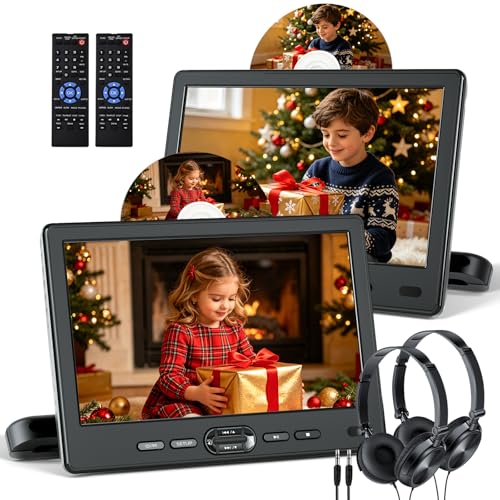
This 10.5‑inch headrest system focuses on rear‑seat entertainment with HDMI In/Out and the ability to play the same or two different movies. Best for: households wanting independent rear‑seat viewing with flexible connectivity. Why selected: large screens and HDMI options for bigger displays.
Caution: HDMI input compatibility depends on source device; ensure HDMI output compatibility before purchase.
Buying Guide: Key Considerations for Aftermarket Auto DVD Players
- Screen size and installation: Do you want a full double‑DIN unit with a separate mirror display, or a headrest system for rear passengers?
- Smartphone integration: Is Apple CarPlay or Android Auto a priority, or do you mainly need a traditional CD/DVD player with Bluetooth?
- Media formats: Which formats must be supported (CD/DVD, USB, SD card, MP4/AVI, etc.)?
- Connectivity: Should the unit provide Bluetooth for hands‑free calls, steering wheel controls, or Wi‑Fi/mirroring options?
- Power and durability: Consider built‑in battery (for portable models) and overall power consumption for continuous use on long trips.
- Vehicle compatibility: Some units require specific dash layouts or adapters to fit cleanly and retain factory features like backup cameras.
- Ease of use: Touchscreen responsiveness, remote control availability, and clarity of on‑screen menus matter for driving safety.
- Safety features: Look for stable Bluetooth hands‑free calling, clear microphone pickup, and reliable backup camera integration when included.
Frequently Asked Questions
- What is the main advantage of a double‑DIN unit with CD/DVD playback?
It provides built‑in media playback alongside modern smartphone integration, reducing the need for separate media devices.
- Can these head units support both CarPlay and Android Auto?
Many options support both, but some models emphasize one platform more. Check the product features for CarPlay and Android Auto availability.
- Are portable DVD players suitable for cars?
Yes, portable units are ideal for backseat passengers, especially on long trips, but they require mounting or placement in the vehicle.
- Do these units improve safety?
They can, by offering hands‑free calling via Bluetooth and clearer audio/video interfaces, as long as drivers avoid interacting with the screen while driving.
- Is a backup camera included or required?
Some units include a backup camera; others may offer camera compatibility as an option. Check the product listing for camera inclusion or compatibility notes.