Answering the demand for safer, hands-free driving data, these HUD (Head-Up Display) units show essential car information directly in your line of sight. The top picks below are best for drivers who want quick speed, RPM, temperature, and voltage readouts without glancing away from the road. Ideal buyers include daily commuters seeking easier speed awareness, tech enthusiasts wanting multiple display options, and drivers who value non-destructive installation options.
Summary table of selected products:
| Product | Best For | Installation | ||
|---|---|---|---|---|
| Head Up Display, P8 (OBD II & GPS) | All-round safety | A-pillar or dashboard | Not specified | Dual data streams with GPS and OBD II |
| wiiyii P6 OBD+GPS Gauge | Speed and navigation enthusiasts | Dashboard or windshield | Not specified | Multiple interfaces and fault code readouts |
| wiiyii A8 HUD | General OBD II users | Dashboard | 5.5 inch | Large display with rich data |
| Ymiko HUD Projector | Value-focused drivers | OBD II compatible, multiple modes | Not specified | Multiple alarms and interfaces |
| Qivine 3.5 Inch HUD | Compact, simple setup | OBD II plug-in | 3.5 inch | Balanced features and size |
Head Up Display, P8: OBD II & GPS Dual System

This P8 model from wiiyii supports both OBD II and GPS data streams, integrating dual data sources into one display. It can be installed on the A-pillar trim or placed on the dashboard for flexible mounting. It reads vehicle data and presents it at an adjustable angle to minimize driver distraction, making it suitable for daily commutes and highway driving. Limitations include the need for a USB power source and potential setup slightly longer than a basic HUD when aligning the viewing angle.
Best for: drivers who want a dual-source HUD with flexible mounting and straightforward setup. Choose this if you prefer GPS data alongside standard OBD II readings for situational awareness.
wiiyii OBD2 Gauge Display (P6)

The P6 HUD from wiiyii emphasizes a safer driving experience by keeping critical data in the driver’s line of sight. It features 10 interface options and dual install methods—dashboard or windshield—so you can tailor the setup to your vehicle and preference. Best for drivers who want quick access to speed, RPM, and fault codes without distractions. Limitation: some users may need to explore software interfaces to find their preferred view under various lighting conditions.
wiiyii A8 Heads Up Display
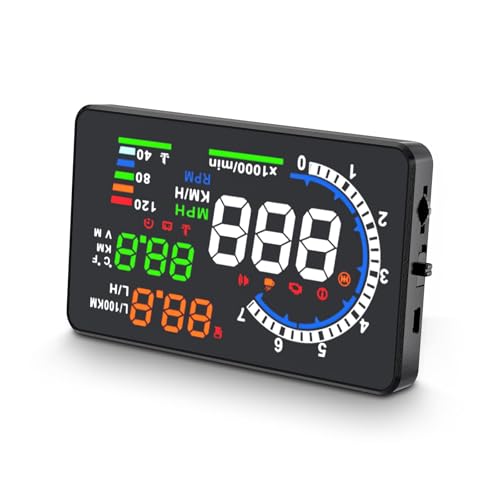
The A8 HUD offers a large 5.5-inch display and robust OBD II compatibility. It provides speed, voltage, water temperature, and driving distance data with flexible unit switching (km/h and mph). It is best for drivers who want a clear, expansive readout and a variety of display options. Caution: applicability is limited to vehicles supporting OBD II, which excludes some older models and certain markets.
Ymiko Car HUD Projector

This projector HUD focuses on OBD II compatibility and offers multi-function display including speed, RPM, temperature, voltage, and fault alerts. It supports overspeed and voltage alarms, plus fatigue driving reminders. It suits buyers who want a feature-rich display with multiple interface modes. Limitation: as a projector, brightness and glare can vary with windshield material and lighting conditions.
Qivine 3.5 Inch HUD
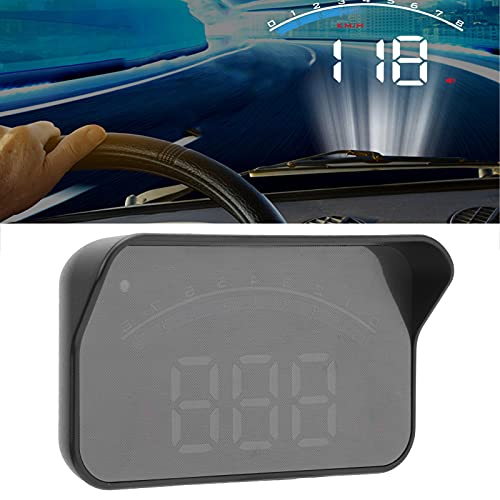
Qivine’s compact 3.5-inch HUD provides essential OBD II data with multiple interface modes and color options. It is best for drivers who want a small, unobtrusive readout that still delivers speed, RPM, and temperature. Best for smaller cars or drivers who prefer a minimalistic display. Limitation: the smaller screen may be harder to read at a glance in bright sunlight or for users who want more granular data at a glance.
Buying Guide
What should you look for when choosing an OBD II HUD?
- Display size and legibility: Larger screens are easier to read at a glance, but may be more visually intrusive. Consider your vehicle’s interior and windshield angle.
- Data channels: Determine which data you need—speed, RPM, temperature, voltage, fuel consumption—and whether you want GPS integration or solely OBD II data.
- Installation method: Some units mount on the A-pillar, others on the dash or windshield. Check your vehicle’s trim and ease of access for wiring.
- Ease of use: Look for multiple interface options and straightforward setup, including plug-and-play power.
- Alerts and safety features: Overspeed alarms, fault codes, and fatigue reminders add value for long trips or new drivers.
FAQ
- Do HUDs require professional installation? Most OBD II HUDs are designed for DIY installation and plug-and-play power. Some variants offer windshield or dash mounting to suit different vehicles.
- Will the HUD work in all cars? HUD compatibility depends on OBD II support and regional standards. Check the vehicle’s model year and whether it uses OBD II or EU OBD.
- Can I switch units between mph and km/h? Yes, most HUDs provide a unit switch for speed and distance measurements.
- Do HUDs show more than speed? Many models display RPM, voltage, water temperature, and driving distance, plus fault codes and alarms.
- Is glare a problem on sunny days? Some models include brightness adjustment and anti-glare features; consider reflective film if needed for windshield displays.
- Can I install on the A-pillar? Several units support A-pillar mounting, offering safer viewing angles without looking away from the road.