Answering the search for reliable windshield-projected GPS, this guide highlights five top options that project speed, direction, and alerts directly onto your windshield. Each pick targets a different driver need—urban commuters, long-haul truckers, RV travelers, and safety-conscious users. The list emphasizes clarity, easy setup, and practical alarms to reduce distraction. Read on to compare how these HUD and windshield GPS devices perform in real-world driving conditions, and find the best fit for your vehicle and daily routes.
Overview of selected products:
| Product | Best For | Key Benefit |
|---|---|---|
| MAIMEIMI HUD | Everyday city driving | Compact, real-time speed + compass with fatigue and overspeed alerts |
| HINYFVOZ GPS Navigator | Long trips with updates | 7-inch touch display, free lifetime map updates |
| Garmin Drive 53 | Easy-to-use navigation | High-contrast screen with driver alerts |
| CIMIAUTO HUD | General use with safety alarms | Real-time data, overspeed and fatigue alarms |
| AZIJYV M1 HUD | Simple, quick setup | Clear white projection, MPH/KM/H switchable |
MAIMEIMI Windshield HUD Digital Speedometer

The MAIMEIMI HUD uses the windshield as a projection surface to display real-time speed data and travel direction. It provides a large, easily readable speedometer and preserves the driver’s line of sight. Best for drivers who want a simple readout without clutter.
- Best for: daily urban driving where quick speed checks matter more than complex data
- Why selected: clear projection, automatic brightness, and two alarms for overspeed and fatigue
- Limitations: relies on built-in light sensor; manual brightness adjustment is recommended in very bright conditions
GPS Navigator for Car Truck RV 7-Inch

This 7-inch GPS navigator targets long trips and larger vehicle fleets with free lifetime map updates and safety alerts. It’s best for drivers who need staying current on road networks and proactive guidance on truck and RV routes.
- Best for: long trips and professional driving where up-to-date maps matter
- Why selected: lifetime map updates; alerts for speed cameras and red lights
- Limitations: interface may be busier than basic HUDs, requiring more attention to screen interaction
Garmin Drive 53 GPS Navigator

Garmin Drive 53 emphasizes simple menus and clear maps with proactive driver alerts. It suits drivers who prefer straightforward navigation with essential safety warnings on the go.
- Best for: drivers who value simple operation and clear route guidance
- Why selected: high-contrast display and essential driver alerts
- Limitation: smaller screen than some modern models; fewer advanced HUD features
CIMIAUTO Windshield GPS Speedometer HUD
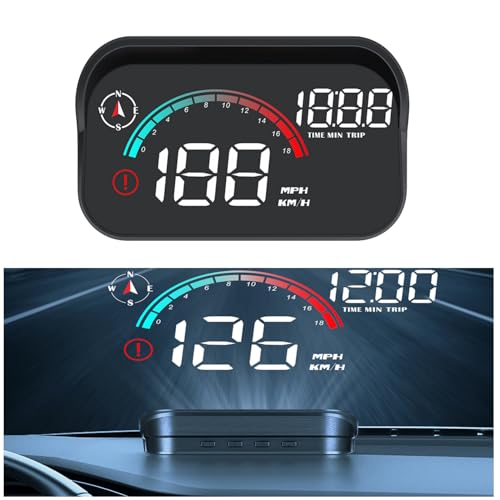
CIMIAUTO’s HUD focuses on real-time speed, compass direction, and fatigue warnings. It is well-suited for drivers who want a compact, multi-function head-up display with customizable alarms.
- Best for: safety-minded drivers who want a compact HUD with clear alarms
- Why selected: accurate real-time data and robust safety features
- Limitations: setup may require following the manual for optimal brightness and alarm levels
AZIJYV M1 Heads Up Display
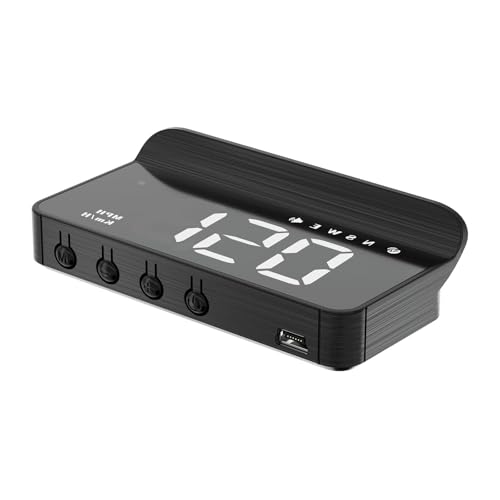
AZIJYV M1 HUD offers a minimalist white projection with essential data like speed and driving direction. It also includes an overspeed alarm and fatigue warning. Best for users who want a plug-and-play unit with a simple display.
- Best for: quick setup and clean windshield projection
- Why selected: simple white display and dual-unit speed options
- Limitations: projection may be less visible in bright daylight without manual brightness adjustments
Buying Guide
Key considerations when choosing windshield GPS or HUD devices:
- Projection clarity: Consider brightness control and screen size. Bigger displays help in quick glances without distraction.
- Units and alarms: Ensure MPH/KPH options and the presence of overspeed and fatigue reminders align with your driving style.
- Map updates and coverage: For road networking and route accuracy, lifetime map updates are valuable, especially for long-term use.
- Power and installation: Check compatibility with your vehicle’s power supply and whether the unit requires hard wiring or simple USB power.
- Ease of use: Look for simple setups with intuitive controls and clear on-screen prompts.
- Vehicle compatibility: Some HUDs suit cars only; others work with trucks, RVs, or motorcycles. Verify compatibility before purchase.
FAQs
- What is a windshield HUD and how does it help driving safety?
– It projects essential data onto the windshield, allowing quick glances without looking away from the road, reducing distraction. - Do HUD devices require a professional installation?
– Most HUDs are plug-and-play or simple to install; check your model’s manual for power and mounting guidance. - Can HUDs display both MPH and KM/H?
– Yes, many units support multiple speed units and let you switch between them in settings. - Are there any drawbacks to windshield HUDs?
– Visibility can be affected by brightness conditions; manual brightness adjustments are often recommended for day or night use. - Do these devices provide real-time traffic updates?
– Some models include live map updates or traffic alerts, while others rely on preloaded routes and built-in alerts.