Finding a reliable OBD-II power cable for your dash cam helps keep recordings ongoing—even when the engine is off. This guide compares five popular options, highlighting who each is best for, why it works, and any limitations. Ideal buyers include drivers seeking continuous 24/7 parking mode, those who want easy plug-and-play installations, and fleets needing dependable low-voltage protection. The table below summarizes core details to help you compare at a glance.
| Product | Best For | Key Benefit |
|---|---|---|
| Pxm&MM OBD II Power Cable | Continuous recording, vibration-activated power | Three low-voltage cutoffs and auto power-off |
| BNnYY OBD2 to USB C Power Adapter | Daily use with parking mode options | Smart dual-mode switch with 11.6V/23.4V protection |
| REDTIGER OBD Hardwire Kit | 24/7 parking monitoring for REDTIGER cams | Universal fit, 5V/3A max |
| Binyoansm OBD Cable with USB-C | Plug-and-play for USB-C dash cams | Simple plug-in, 11.6V cutoff option |
| Suplogico Dash Cam Power Cable | Hidden installation with 24/7 mode | Low voltage protection and 24/7 parking |
Note: Some cables are designed for continuous power via the OBD-II port and may not support true “park mode” in all dash cams. Always verify your vehicle’s constant power capability and your dash cam’s power pin compatibility before purchasing.
Pxm&MM OBD II Constant Power Cable
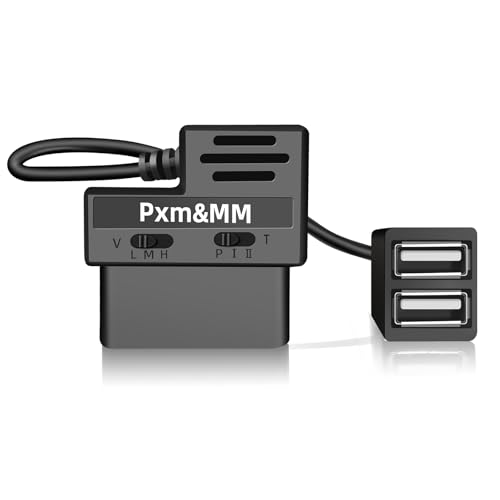
This cable powers a dash cam through the OBD-II port with a built-in vibration sensor. It activates power as soon as movement is detected and offers adjustable low-voltage cutoffs to protect the car battery. Best for buyers who want continuous recording triggered by vehicle activity rather than ignition status. A limitation is that it does not provide a true park mode based on ignition; it relies on vibration sensing.
- Vibration-activated power supply for dash cam
- Three low-voltage cut-off points to protect the battery
- Automatic power-off at chosen voltage
Who it’s for: drivers needing continuous recording during movement and in some parking scenarios, especially when park mode is not essential. Why selected: robust auto-protection features and straightforward operation.
BNnYY OBD2 to USB C Power Adapter

This kit combines a smart dual-mode switch with 11.6V/23.4V low-voltage protection for 12V and 24V vehicles. It plugs into the OBD-II port for a plug-and-play installation and supports 24/7 surveillance or a daily auto-power-off mode. Best for: users who want clear mode options and reliable battery protection. Limitation: verify authentic BNnYY branding to ensure the safety standards.
- Dual-mode switch: Daily or 24/7 surveillance
- Low-voltage protection at 11.6V (12V systems) or 23.4V (24V systems)
- 3.5-meter cable for flexible placement
Who it’s for: daily drivers and fleet operators seeking easy installation plus robust protection. Why selected: clear mode choices and smart voltage monitoring.
REDTIGER OBD Hardwire Kit with USB C

Designed for REDTIGER dash cams, this hardwire kit provides 24/7 parking monitoring and 5V/3A output via a USB-C port. It fits multiple voltages (12V–24V) and aims for a clean, hidden installation thanks to direct OBD port power. Best for: REDTIGER users seeking reliable continuous power without fuse tapping. Limitation: check compatibility with non-REDTIGER cameras, as signal pin variations can occur.
- 24/7 parking monitoring ready
- Multi-vehicle voltage compatibility (12V–24V)
- USB-C output for REDTIGER dash cams
Who it’s for: owners of REDTIGER cameras or those who want a straightforward, non-invasive install. Why selected: strong parking support and clean integration.
Binyoansm OBD Dash Cam Power Cable
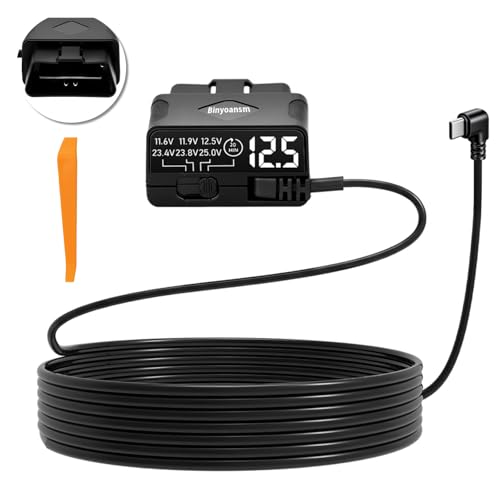
This USB-C OBD power kit emphasizes compatibility checks and plug-and-play installation. It requires constant 12V power from the OBD port to enable parking mode and USB output. It is best for buyers who enjoy a beginner-friendly setup and want a clean, quick installation. Limitation: compatibility varies by vehicle; verify your OBD port’s continuous power and the dash cam’s USB-C requirements before purchase.
- Plug-and-play with OBD-II port
- 5V/3A output for dash cams
- 11.6V low-voltage option for protection
Who it’s for: those who value a quick install and clear compatibility checks. Why selected: straightforward use and emphasis on power reliability.
Suplogico Dash Cam Hardwire Kit

Suplogico offers a plug-and-play OBD2 to USB-C cable with 24/7 parking mode and 11.6V low-voltage cutoff. It is suitable for 12V vehicles and emphasizes hidden installation. Best for: installers who want a fuse-free approach and continuous surveillance. Limitation: not compatible with EVs or vehicles outside the 12V range; verify vehicle support before buying.
- 24/7 parking mode with ACC support
- Low-voltage cutoff at 11.6V
- Plug-and-play without fuse tapping
Who it’s for: drivers seeking a simple, hidden installation with reliable parking recording. Why selected: easy setup and strong low-voltage protection.
VibeXtr OBD Power Cable USB C

VibeXtr’s kit is a general-purpose USB-C OBD power cable that supports 12–24V vehicles and emphasizes compatibility with many dash cam brands. It provides 24/7 parking mode and a plug-and-play installation. Best for: buyers seeking a broad compatibility option across multiple dash cam brands. Limitation: it may not work with certain brands using different signal pins; verify dash cam compatibility before purchase.
- Plug-and-play OBD power to USB-C
- 24/7 parking mode with low-voltage protection
- Supports 12–24V vehicle systems
Who it’s for: users needing a versatile, broad-compatibility power cable. Why selected: wide vehicle support and easy installation.
Buying Guide: Key Considerations for OBD-II Dash Cam Power Cables
How to choose the right OBD power cable depends on your dash cam model, desired monitoring mode, and vehicle electrical system. Consider the following questions and answers to guide your decision.
What type of power mode do you need?
If you want continuous footage even when the engine is off, look for 24/7 parking mode or continuous power options. If you only need parking monitoring when the car is off, a model with a simple on/off switch or a per-time setting may suffice.
Is your vehicle’s OBD-II port providing constant power?
Some vehicles do not supply constant power on the OBD-II port when the engine is off. Verify with the owner’s manual or a multimeter to ensure continuous power before purchase, otherwise the dash cam may not stay active in park mode.
What voltage range does your setup require?
Most adapters support 12V and 24V systems. Check your vehicle’s compatibility and choose a cable with automatic low-voltage protection to prevent battery drain.
Does your dash cam use USB-C or micro USB?
Many OBD adapters offer USB-C outputs. Confirm your dash cam’s port type to ensure proper power delivery and compatibility with signal pins used by the OBD adapter.
How important is a plug-and-play installation?
For a clean install, prioritize cables advertised as plug-and-play with no fuse tapping. This reduces installation time and risk to vehicle wiring, especially in fleets or rental vehicles.
Any brand or model-specific caveats?
Some brands use unique signal pins or have park modes that differ from other cameras. Always check the product’s compatibility notes and user manuals for A5-B5 or other pin mappings to avoid incompatibility.
Frequently Asked Questions
- Do OBD power cables always provide 24/7 recording?
Not always. Some cables enable park mode only when the engine is off, while others provide continuous power via vibration sensing or constant supply. Verify your dash cam’s requirements and the cable’s mode.
- Will these cables void my car warranty?
Plug-and-play OBD cables generally avoid fuse-box modifications, reducing risk to warranties, but always verify with your vehicle’s warranty terms and the cable’s compatibility notes.
- Can I use any OBD power cable with any dash cam?
Not necessarily. Some dash cams use different signal pins or voltage requirements. Check the dash cam’s power input spec and the cable’s pin compatibility before purchasing.
- What safety features should I look for?
Low-voltage protection (e.g., 11.6V or 12V), auto shutoff, and auto reset features help prevent battery drain and ensure the vehicle starts reliably after parking.
- Is 12V to 24V compatibility important?
Yes. Vehicles range from 12V to 24V systems, especially in fleets and trucks. A cable that supports a wide range provides broader applicability.
- Do any cables support non-Thinkware or non-REDTIGER cameras?
Some cables are brand-agnostic, while others are optimized for specific brands. Check compatibility notes for signal pin mappings and output voltage to ensure cross-brand use.