Answering the common buyer question: these overhead car video systems are best for backseat passengers, long road trips, and vehicles lacking built-in rear-seat entertainment. They cover a range from compact 11.6 inch models to expansive 19.5 inch screens. This guide highlights five top options, explains who each is best for, and shows why they stand out. Ideal buyers include families with kids, drivers seeking quiet cabins for long drives, and fleet operators wanting reliable in-vehicle media. Below is a quick comparison table of the selected models to help you decide at a glance.
| Product | Screen Size | Best For | Why Selected |
|---|---|---|---|
| XTRONS 17.3″ Ultra-Thin | 17.3″ | Families needing bright full HD rear-seat viewing | Large Full HD display with built-in HDMI; sleek design fits many headliners |
| XTRONS 14″ Overhead | 14″ | Mid-size cars and SUVs | 1080p playback with multiple input options; built-in stereo |
| XTRONS 19.5″ Car Overhead | 19.5″ | Vehicles with space for a big screen | Largest option with 1080p, multiple inputs, strong multimedia support |
| XTRONS 14″ Android | 14″ | Tech-savvy buyers | Android OS, WiFi, Bluetooth, screen mirroring; app access |
| Pyle 15.6″ PLRV1525 | 15.6″ | Budget-friendly, feature-rich | IR, FM transmitter, built-in speakers, versatile inputs |
XTRONS 17.3 Inch Ultra-Thin Overhead Monitor

The 17.3-inch full HD overhead monitor is designed for clear, backseat viewing with a 1920×1080 resolution. It includes a built-in HDMI port for easy connection to media players, tablets, or other HDMI-enabled devices, and a blue LED light bar for ambient styling. This model is ideal for buyers who want a large, bright display without a DVD drive. Best for families or fleets seeking straightforward media playback with minimal setup. Caution: double-check the fitment against your vehicle’s headliner shape and mounting space before purchase.
XTRONS 14 Inch Overhead Car Monitor

This 14-inch digital HD screen provides a sharp viewing experience in cars, SUVs, and commercial vehicles. It supports 1080p video and multiple formats (AVI, 3GP, MP4, TS, MP3, WMA, WAV, JPG, BMP). Built-in stereo speakers eliminate the need for external sound for most setups, and Bluetooth audio transmission adds flexibility. Best for mid-size vehicles where a balance of screen size and installation depth matters. Choose this if you want compact depth with strong audio playback; avoid if you require Netflix or heavy app use without an Android system.
XTRONS 19.5 Inch Car Overhead Player

The 19.5-inch monitor is the largest option in this list, designed for bigger vehicles like minibuses or motor homes. It offers 1600×900 resolution for vivid color and detailed imagery, along with true 1080p video support. With HDMI, USB, and AV inputs, it accommodates a wide range of media sources. Best for travelers who prioritize a cinema-like backseat experience in large cabins. Caution: the size may be challenging to fit in smaller headliner spaces; check mounting depth and clearance beforehand.
XTRONS 14 Inch Android Overhead Player

This 14-inch Android-based overhead player turns the car into an on-the-road multimedia hub. It runs Android OS, supports WiFi and Bluetooth, and allows app installation (Netflix, YouTube, and more). Screen is 1366×768 with a 120-degree tilt for flexible viewing. Best for tech-forward families who want streaming apps and screen mirroring. Choose this if you need portable screen-sharing and app access; may require careful data management on the road and reliable WiFi or hotspot.
Pyle 15.6-Inch Overhead Monitor 15.6″ PLRV1525
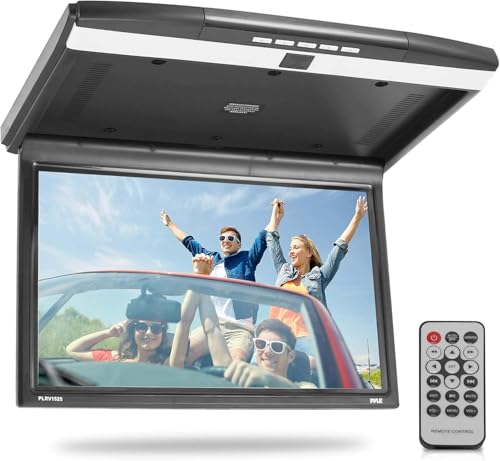
The Pyle PLRV1525 provides a 15.6-inch display with high-resolution capabilities and built-in stereo speakers. It includes an IR transmitter for wireless headphones and a FM transmitter for integrating with a vehicle’s audio system. It supports HDMI, USB, SD, and AV inputs, giving flexible media sources. Best for budget-conscious buyers who want a well-rounded feature set. Limitations include the need to manage external audio output if your vehicle’s speakers aren’t optimal for backseat playback.
Buying Guide
What screen size should I choose?
Smaller screens (11.6″) are less obtrusive but may require closer viewing; 14″ and 15.6″ strike a balance for most mid-size vehicles; 17.3″ and 19.5″ deliver cinema-like experiences for families with multiple backseat viewers. If you drive a large vehicle or transport many passengers, a bigger screen can reduce eye strain and improve visibility for each rider.
What inputs and formats matter?
Look for HDMI for modern media devices, USB for local playback, and AV options for legacy players. 1080p playback is common across these models; MP4 and AVI are typical supported formats. If you want to mirror a smartphone or tablet, Android-based units or those with screen mirroring are advantageous.
Why consider built-in speakers vs. external audio?
Monitors with built-in stereo speakers simplify installation and reduce cable clutter. If you already have rear-seat headphones or plan to use wireless IR headphones, a model with an IR transmitter or Bluetooth audio makes sense.
Is installation compatibility a concern?
Overhead monitors require headliner mounting space. Confirm the mounting depth, hinge angles, and whether the unit folds flat when stowed. In compact vehicles, slimmer profiles and shallower mounting housings are preferable to avoid interference with sun visors or ceiling components.
What about durability and maintenance?
Choose models with robust hinges and a stable tilt mechanism. Some units include a 170° viewing angle or up to 130° for flexible seating. Ensure the unit can handle the vehicle’s vibration and temperature variations on long trips.
FAQ
- Do overhead monitors require a DVD drive? Most modern units do not include a built-in DVD drive; they rely on HDMI, USB, and streaming formats for media playback.
- What’s the best option for large families? A larger screen like 17.3″ or 19.5″ with multiple input options and clear 1080p playback is ideal for multiple backseat viewers.
- Can these units connect to my smartphone? Android-based models offer screen mirroring and app access; others support HDMI input for phone or tablet connections.
- Are built-in speakers enough? Built-in stereo speakers are usually adequate, but you can pair with IR headphones or your vehicle’s audio system if needed.
- What should I check before buying? Verify fitment in your vehicle, mounting depth, screen angle range, and compatibility with your desired media sources.
These overhead car video systems provide a range of features to match different priorities, from size and image quality to app access and audio output. Use this guide to determine whether you want a large, cinema-like experience for families or a compact, Android-powered unit for tech-savvy journeys. The selected models emphasize compatibility, ease of use, and practical media playback so you can enjoy backseat entertainment on every trip.