Answering the needs of shop owners and technicians, this guide highlights top wheel aligner systems built for garage environments. These picks favor 3D measurement, robust imaging, and easy workflow integration to help professional technicians achieve precise alignments quickly. Ideal buyers include independent repair businesses, small to mid-size shops upgrading their alignment capabilities, and technicians seeking dependable, cable-free operation. Below is a quick summary of five strong candidates and how they serve different workflows.
| Product | Brand | Best For | Notes |
|---|---|---|---|
| AUTOOL 3D Wheel Aligner (Dual 20″ Screens) | AUTOOL | Busy shops needing dual-display workflow | Built-in printer; high-contrast HD screens |
| KATOOL KT-AV9 3D Wheel Alignment | KATOOL | Mobile-friendly setups (tablets/phones) | Android-based 3D measurement; cross-device readings |
| EQCOTWEA 3D Wheel Alignment | EQCOTWEA | High precision, fast setup | 0.1mm/0.01° accuracy; 60,000+ vehicle specs |
| XK V89 Wheel Alignment | XK | All-in-one 3D four-wheel aligner | Multiple language support; CE certified |
| AV9 Pro Wheel Alignment Machine | CHERY INDUSTRIAL.COM | Lifted vehicle compatibility (2-post/SC lifts) | Android/iOS display; mobile system integration |
AUTOOL 3D Wheel Aligner With Dual 20″ Screens
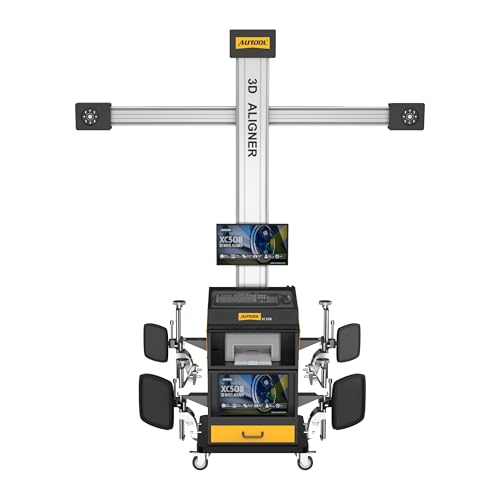
Best for shops that prioritize data visibility and professional reporting. The dual 20-inch HD interactive screens allow technicians to view alignment data while controlling measurements, minimizing back-and-forth between devices. The built-in thermal printer delivers instant reports, which is ideal for customer presentations and documentation. A high-speed 3D camera array provides stable readings in typical garage lighting and vibration. Consider this option if you want a turnkey workflow with an emphasis on data presentation and on-site archiving. Caution: larger footprint requires adequate floor space.
KATOOL KT-AV9 3D Wheel Alignment Machine
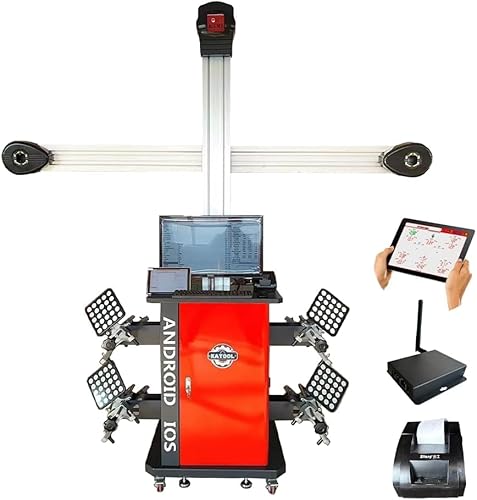
Choose this if you prefer compatibility with iOS devices as display terminals and want cross-device operation. The KT-AV9 uses an Android-based 3D camera system and supports synchronized readings across PC, tablet, and smartphone. This makes it well-suited for shops adopting a flexible, mobile-first workflow. Limitation to note: ensure your network and devices stay synchronized during busy periods to avoid data misalignment.
AUTOOL 3D Wheel Alignment Machine Fully Automatic

Best for shops seeking high-precision, automated alignment with robust data traceability. This model emphasizes high-precision data capture, voice guidance, LED indicators, and printed reports. It supports traceability of test data, including historical reports. A good fit for auditors or shops that regularly archive alignment histories. Caution: ensure the system’s wireless and camera alignment paths are kept clear of vibrations that can affect readings during motion.
XK V89 Wheel Alignment Machine 3D System

This option is best for shops needing 3D four-wheel alignment with broad language support and a portable footprint. It notes 3D measurement capabilities and compatibility with multiple testing standards. A potential limitation is that some users find setup and software updates more involved, so allocate time for training and regular software maintenance.
EQCOTWEA 3D Wheel Alignment With Auto Tracking

Best for technicians who value ultra-precision and quick setup. The system offers 0.1mm/0.01° accuracy and a robust vehicle-spec database (60,000+ entries). It features LED-guided alignment with printable reports to aid diagnostics of tire wear and suspension issues. A caution is that the initial calibration independence helps speed, but users should follow clean installation guidelines to maintain accuracy.
Buying Guide: Wheel Aligner Garage Equipment
What should you look for when choosing a wheel aligner for a garage?
- Measurement precision: Prioritize 3D cameras and high-resolution imaging. Look for 0.1mm or better tolerances and angle accuracy around 0.01° for reliable results.
- Display and workflow: Dual screens or mobile-friendly displays can streamline operations. Decide between fixed or portable terminals based on workspace layout.
- Data handling: Built-in printers and robust data export help with customer reports and record-keeping. Check for compatibility with digital records and cloud storage if needed.
- Vehicle compatibility: Ensure the system recognizes a wide range of vehicles and wheel sizes. A large vehicle database simplifies setup for common shop fleets.
- Ease of use and training: Systems with guided voice or LED prompts reduce operator error. Consider the learning curve for technicians new to 3D alignment.
- Upgrade and support: Look for systems with software updates and accessible technical support. A modular design can simplify future upgrades.
Choosing Between Systems: Quick Comparisons
- Best for data-rich shops: AUTOOL with dual HD screens and built-in printer supports fast, professional reporting.
- Better for mobile or tablet-heavy shops: KATOOL KT-AV9 offers strong cross-device compatibility (PC, tablet, smartphone).
- Best for precision-first work: EQCOTWEA delivers high accuracy and a large pre-loaded vehicle database.
- Choose this if you want a broad-language, four-wheel approach: XK V89 emphasizes 3D four-wheel alignment and international usability.
- Avoid if you need ultra-compact gear: Some of these models require more floor space due to screens and camera arrays.
Frequently Asked Questions
- What is a wheel alignment system used for in a garage? Answer: It measures and adjusts a vehicle’s suspension and steering angles to ensure proper tire contact and handling.
- Do 3D wheel aligners work on all vehicle types? Answer: Most handle cars, light trucks, and many commercial vehicles, but verify with the specific model’s vehicle database.
- Is built-in printing essential? Answer: It helps create immediate customer reports and archives, but external report options are available on some systems.
- Do these systems require calibration? Answer: Many offer automatic setup, but periodic checks are recommended to maintain accuracy.
- Can I use tablets or phones with these aligners? Answer: Several models support tablet or smartphone displays, enabling flexible operation.
- What’s the best way to choose a system for a small shop? Answer: Consider space, budget, required vehicle types, and whether you prioritize portability, reporting, or automated workflows.